Safe-area auto clicker · Mac & Windows

Safe area auto clicker

Most auto clickers click wherever you point them. Green Dotter clicks only inside the area you choose. You define the zone. It stays there. Free for Mac and Windows.

Official Green Dotter download

Green Dotter is available two official ways: install from the Microsoft Store, or download it directly from green-dotter.com. No account, email address or subscription is required.

Free. No account required.Mac and WindowsClicks only where you choose
Green Dotter’s compact bar on a desktop. It clicks at random points inside one safe area you chose, or wiggles the mouse. Touch the mouse and it pauses, waiting for you. Leave it and it carries on.

Set up in a minute.

Pick a mode and press Start. That's the whole job.

Click

Choose one exact spot, or draw a box and it clicks somewhere inside it. Clicks land at random intervals inside the range you set, so the rhythm isn't mechanical.

Wiggle

Nothing to pick. The mouse drifts a little, the way yours does while you read. Choose how long, press Start, and leave it.
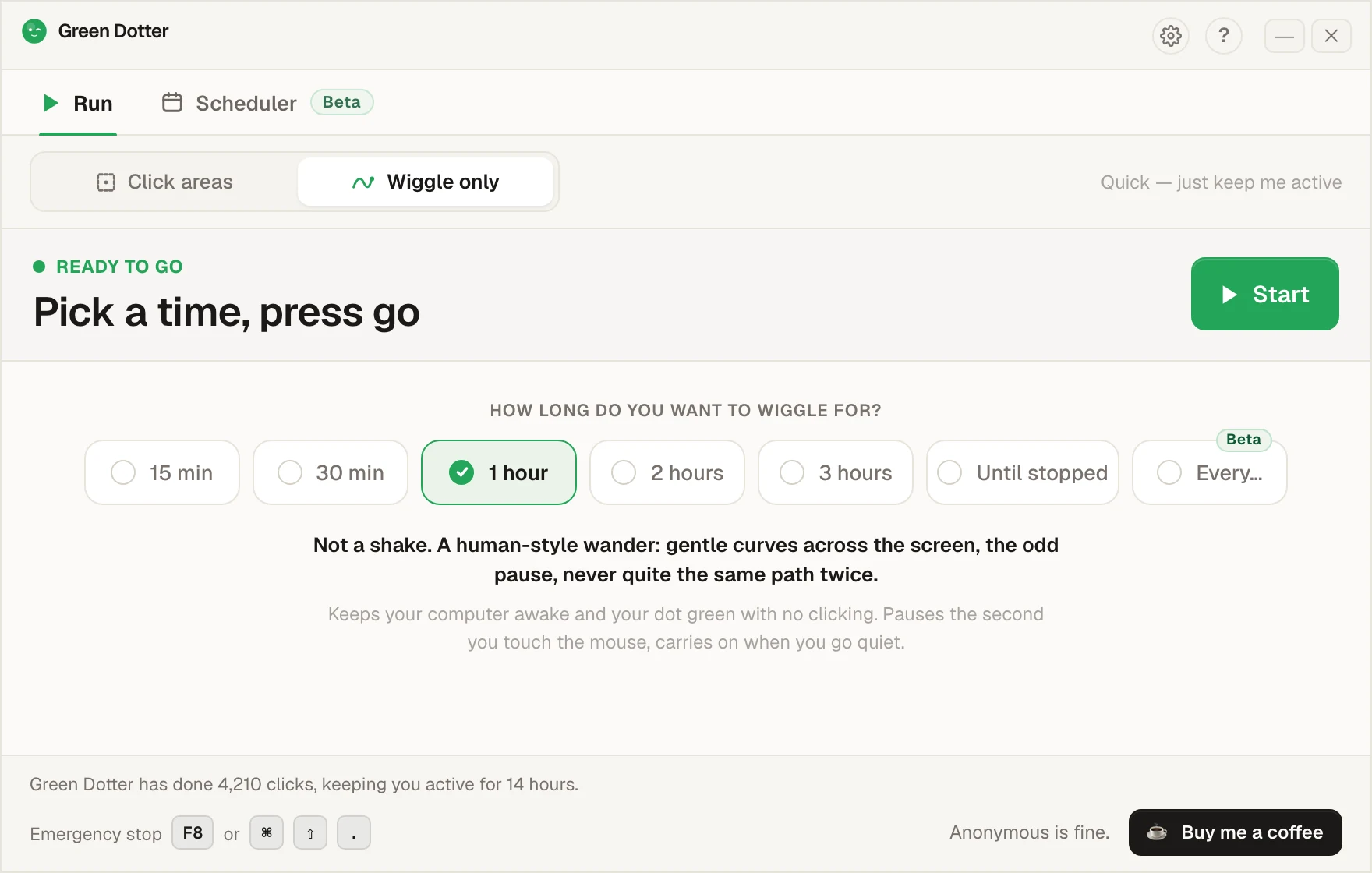
Green Dotter's main screen set to Wiggle only. A row of options offers 15 min, 30 min, 1 hour, 2 hours, 3 hours, Until stopped and Every, with 1 hour chosen, and a green Start button.

It steps aside when you take over.

Touch the mouse and it pauses, then carries on once you stop. While it runs it folds down to a small bar you can park in a corner.
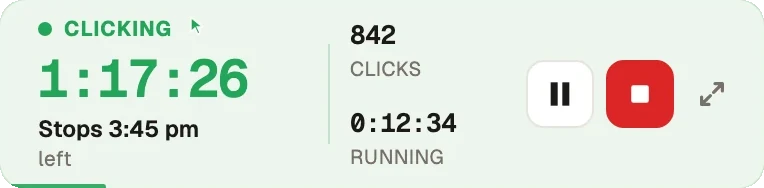
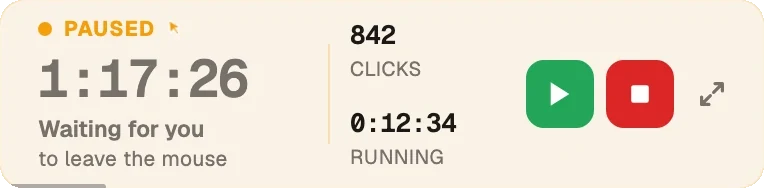
Green Dotter's compact bar while clicking: 1 hour 17 minutes left, stops at 3:45 pm, 842 clicks so far, with pause and stop buttons. The same bar in amber after the mouse was touched: Paused, waiting for you to leave the mouse, with resume and stop buttons.
Beta · new in 2.10

Set the week once.

Pick your days and hours, add a lunch break. Start and stop times shift by a few minutes each day, so it isn't clocking in at 9:00 sharp.
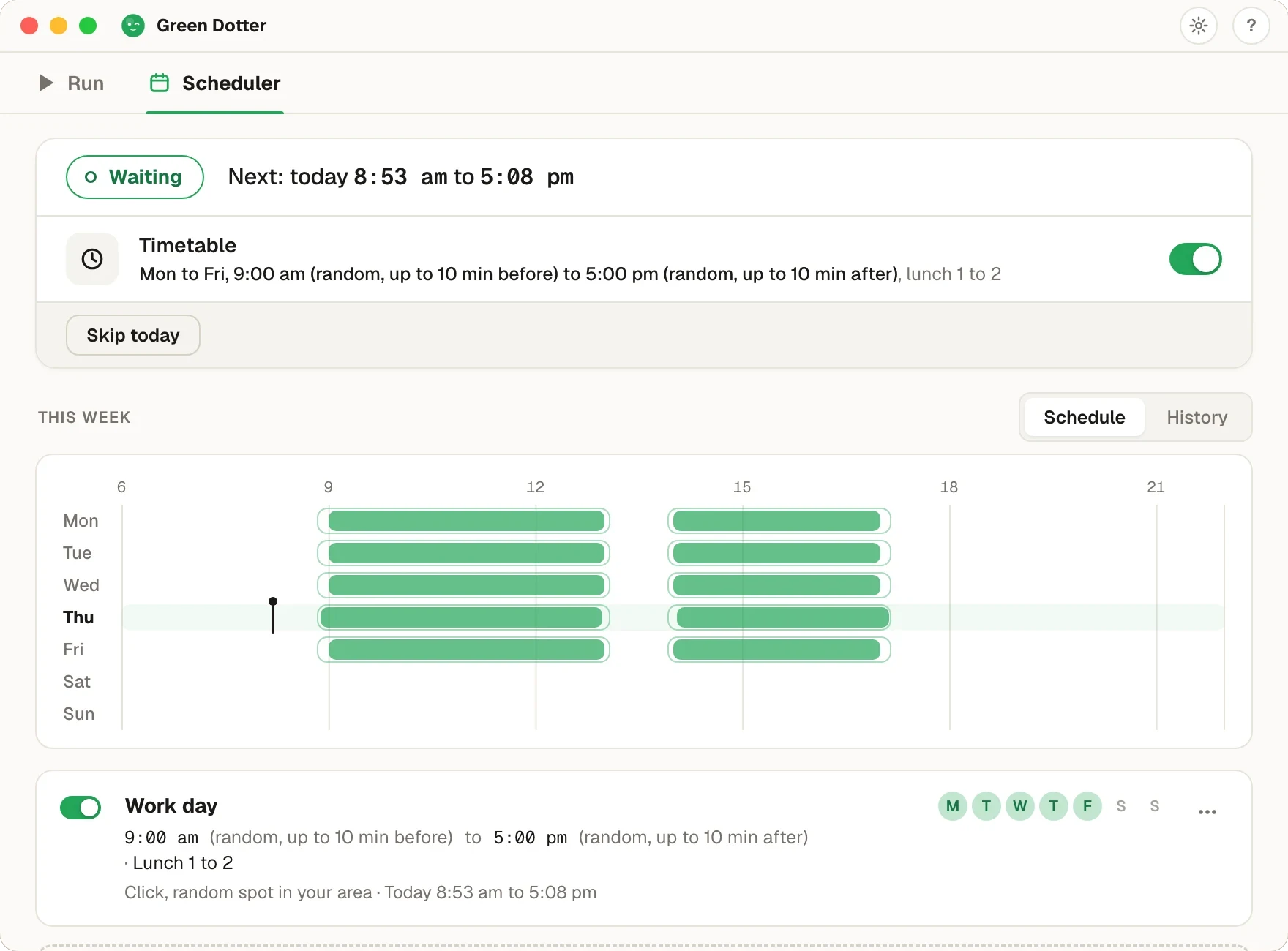
Green Dotter's Scheduler tab. Status Waiting, next run today 8:53 am to 5:08 pm. A Timetable for Monday to Friday, 9:00 am to 5:00 pm with random starts up to 10 minutes before and stops up to 10 minutes after, lunch 1 to 2. Below, a week strip with green bars on each weekday and a gap at lunch.

Green Dotter has to be open, the tray is fine, and your computer on and signed in. It can't wake a sleeping computer. It's new, so if something looks off, tell us.

What is a safe-area auto clicker?

Safe-area clicking means you choose a specific part of your screen where automated clicks are allowed. Green Dotter clicks only inside that area. Nothing outside the area gets touched. No wandering. No surprises.

It sounds simple because it is. But it's the feature that makes controlled desktop automation actually usable. Without it, you're trusting an app to click somewhere that might be a button, a form, or something you really didn't want clicked. With it, you decide exactly where the activity happens.

The problem with fixed-coordinate clicking

A lot of auto clickers work by clicking one exact screen coordinate. You set the X and Y position, and it clicks there every time. That works until something moves.

A notification drops down. A window shifts slightly. The app updates its layout. The sidebar expands. Suddenly the coordinate that used to be harmless is now sitting over a button. Fixed-point clicking assumes your screen stays exactly the same. Screens don't.

Safe-area clicking is more resilient. You define a region, not a single pixel. Clicks land inside that region. If the window shifts a little, you're still in the right zone. Green Dotter gives you both: a safe area for presence, where any harmless spot will do, and One exact spot for when a specific button has to be pressed every time.

How Green Dotter keeps you in control

You choose the click area

Draw the area on your screen. Green Dotter clicks inside it, varying the exact position naturally each time.

Random intervals within your range

Clicks happen at natural timing rather than a rigid fixed beat. Less mechanical, more flexible for long sessions.

Auto-pause when you return

The moment you move the mouse, Green Dotter pauses. You're immediately back in control.

Stop anytime

End the session whenever you like. No runaway behaviour.

What makes a good safe area

Good areas are places where a click does nothing harmful.

  • Empty space in a blank document
  • A quiet, already-read sidebar item
  • A test page or demo environment
  • Empty space in a browser with nothing sensitive open
  • A non-destructive part of the UI with no active buttons nearby

The best safe areas are boring. Boring is exactly what you want.

Areas to avoid: delete, send, or submit buttons; payment or checkout pages; admin panels or production dashboards; message or email compose windows; anything irreversible. If you'd be annoyed by an accidental click there, don't put the area there.

Safe-area clicking vs the alternatives

FeatureFixed-point clickerMouse jigglerGreen Dotter
Human-style wiggle modeNoNoYes
Clicks a fixed coordinateYesNoNo, clicks within selected area
Moves cursor onlyNoYesNo
User defines click zoneNoNoYes
Random timingSometimesSometimesYes
Auto-pause when you returnRareRareYes
Lower accidental-click riskLimitedLimitedBetter controlled
Local app, no accountVariesVariesYes

Want the timing side of the story? See the random interval auto clicker page, or how Green Dotter works as a mouse jiggler alternative. Using a Mac? The auto clicker for Mac page explains the Accessibility permission macOS asks for before any app can click. Comparing tools? Our free auto clicker roundup puts the popular ones side by side.

What people use it for

What Green Dotter doesn't do

  • No screen recording
  • No message access
  • No account or login required
  • Only anonymous usage stats, nothing personal
  • Local app, runs entirely on your machine

It performs the click actions you configure, inside the area you define. Nothing else.

Keep your setup sensible

Choose an area that's genuinely safe. Test it for a minute before walking away. Make sure clicks are landing where you expect. Check your workplace or device policies before using automation on a work machine. There's more detail in our guide to choosing a safe area for an auto clicker.

Common questions

An auto clicker that only clicks inside a screen area you define, rather than at a fixed coordinate or anywhere on the screen.
No. It only clicks inside the area you set.
Yes. You can stop the session, adjust the area, and restart.
Yes. You can stop at any point. Green Dotter also pauses automatically when you move the mouse.
Yes. Native builds for both platforms.
No. Nothing to sign up for.
No. Green Dotter is a local desktop utility. No screen recording, and no personal data: only anonymous usage stats.

Official Green Dotter download

Official Green Dotter download

Green Dotter is available two official ways: install from the Microsoft Store, or download it directly from green-dotter.com. No account, email address or subscription is required.

Get Green DotterControlled clicks, simple setup. Green Dotter clicks where you tell it to, on a natural schedule, and gets out of your way when you're back. Free.